
Minos
A live ledger of session changes, permission modes and work that did not survive.
Minos takes its name from the king of Greek mythology associated with Knossos and judgement of the dead.
- TypeScript
- Bun
- Claude Code
GitHub (opens in a new tab)README (opens in a new tab)Changelog (opens in a new tab)
On this pageFollow the session as it happens
Follow the session as it happens
A final git diff shows what remains. It does not show which changes ran under automatic permissions, what happened inside subagents, or work that was later overwritten.
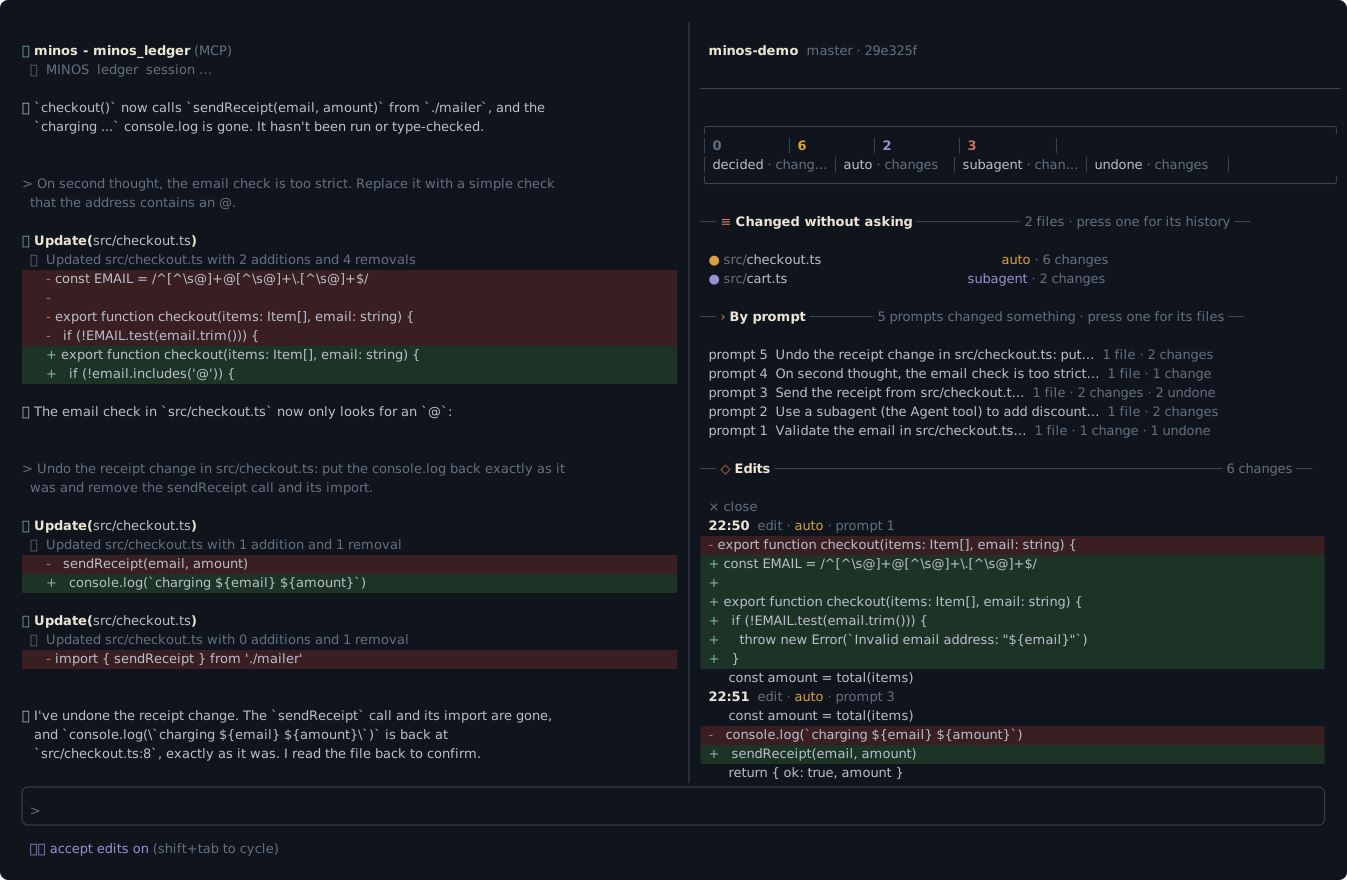
Type /minos in Claude Code to open a live pane beside the chat. It names the project, branch and commit, counts changes by class, and lists the files and prompts behind them. Select a file to inspect each operation as a diff, or a prompt to see what it changed. Earlier sessions open in the same pane.
The pane refreshes after changes and at the end of a turn while it is open. Its hooks read the transcripts Claude Code already writes; Minos adds no separate activity recording.
The agent reads the same ledger
The plugin gives Claude a minos_ledger tool with the same account as the pane and CLI. Its description asks Claude to consult it before declaring work finished, writing a commit message or preparing a pull request description. That request is guidance, not an enforced gate.
When an Edit or Write undoes earlier work in the session, Minos adds a line to the tool result, a toast and the pane. The check does not block the operation. It covers Edit and Write, not NotebookEdit, and stops after 1.5 seconds, so large transcripts can miss a notification.
Permission mode is not proof of approval
The ledger classifies recorded Edit, Write and NotebookEdit calls. Each operation counts once and belongs to exactly one class:
| Class | What the transcript tells you |
|---|---|
decided | The originating prompt used default or plan. Inferred from the mode, never from a recorded approval |
auto | The prompt used acceptEdits, bypassPermissions or auto. Unknown or missing modes also count here |
subagent | Applied inside a subagent; this takes precedence over permission mode |
A standing allow rule can permit an operation in default mode without a prompt. Minos cannot tell whether you read a diff or approved a particular operation. The report states that limit and lists the allow rules in force when you run it, rather than claiming a historical approval record.
Shell commands, MultiEdit and MCP writes are outside these classes. Across-project reports show a separate heuristic count of shell commands that look like file writes.
See the work that disappeared
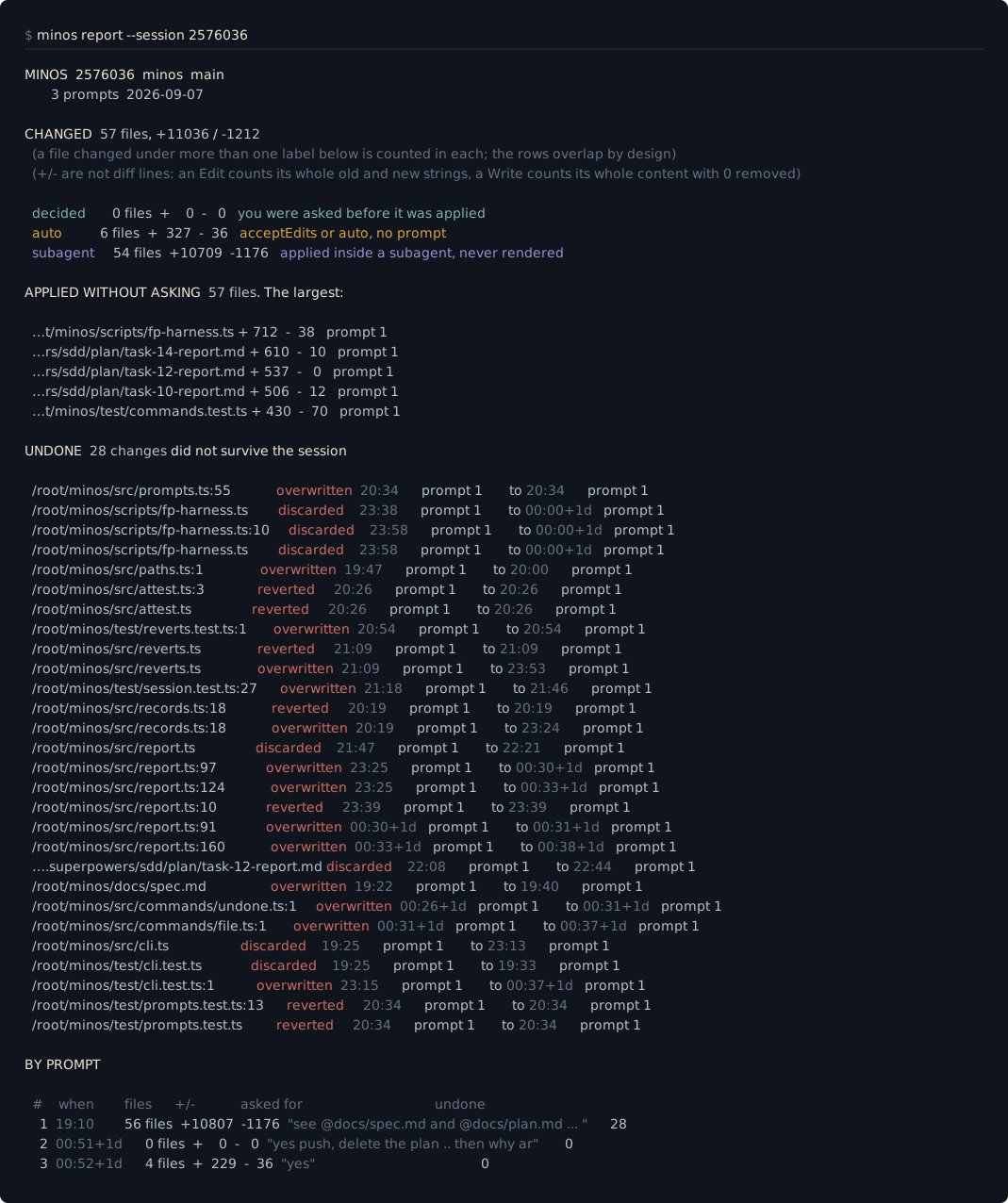
Minos distinguishes text overwritten by a later edit, changes reverted by an exact reverse edit, and text discarded by a later whole-file Write. Findings include operation times and originating prompts where available. Text comparison is an indication, not proof: repeated text and incomplete reconstruction can hide or misidentify a removal.
Getting started
Install the plugin, start a new Claude Code session and run /minos:
claude plugin marketplace add https://github.com/AraneaDev/aranea-marketplace
claude plugin install minos@aranea
Requires Bun 1.1 or newer. The live pane and agent tool require Claude Code 2.1.309 or newer. On older versions, /minos:report and the CLI still provide reports.
Minos is pre-release and is not published to npm. For the standalone CLI:
bun install -g github:AraneaDev/minos
minos report
Minos can report on sessions from before installation, for as long as Claude Code retains their transcripts under ~/.claude/projects, or the location selected by CLAUDE_CONFIG_DIR.
Review one session or every project
minos report        latest session for this directory
minos file <path>   one file's operation history
minos undone        changes that did not survive
minos sessions      sessions with headline counts
minos ledger        a short ledger; --json for data
minos export        the ledger as JSON
minos sessions --all
                    totals across every project
minos export --all every project's counts as JSONreport, file, undone, export and ledger accept --session <id> and --project <path>. sessions accepts --project and --limit <n>. Session listings and exports also support --since YYYY-MM-DD and --until YYYY-MM-DD, inclusive in the local timezone. Across-project reports support repeatable --exclude <glob> and --include-temp.
Resumed or forked sessions can contain the same operation. Combined totals deduplicate by operation ID, while each session row keeps its own counts. sessions --all reports scan coverage, projects with no session in the selected period and which projects it could not read.
Local and read-only
Minos reports recorded operations; it does not review code or stage, commit or revert files. It reads transcripts and current allow rules, writes nothing to ~/.claude or your working tree, makes no network requests and sends no telemetry.