Claude Timestamp
Every message stamped with the time it happened, and how long it took.
What it does
Claude Timestamp is a Claude Code plugin, not an MCP server: hooks that run at fixed points in a session, plus a /timestamps command to change them. Every assistant message gets a marker like [13:22:13] in your own timezone, followed by how long the turn took, such as +2m14s, counted from the moment you pressed enter to the moment the reply appeared. A turn that crosses a threshold you set gets its duration coloured, so you notice it instead of reading past it. A gap between two messages gets its own label, so a session you return to the next morning still reads in order.
The model is also told the local time of each prompt, so it can reason about when things happened; you can switch that off and keep only the visible marker. On exit, a summary follows: how long the session ran, how many turns, how much of that was waiting, and how long you were away.
Display is display only. The marker is drawn as messages render, never enters the transcript, and never reaches the model.
Quick start
Requires jq and bash, nothing else. If jq is missing, the plugin says so once and then does nothing, rather than failing quietly.
claude plugin marketplace add AraneaDev/claude-timestamp
claude plugin install claude-timestamp@aranea-claude-tools
Hooks are bound when a session starts, so start a new session before markers appear. An already-running session will not pick the plugin up.
Examples
The timestamps on real assistant messages, generated by the project's own screenshot tooling against a real Claude Code session.
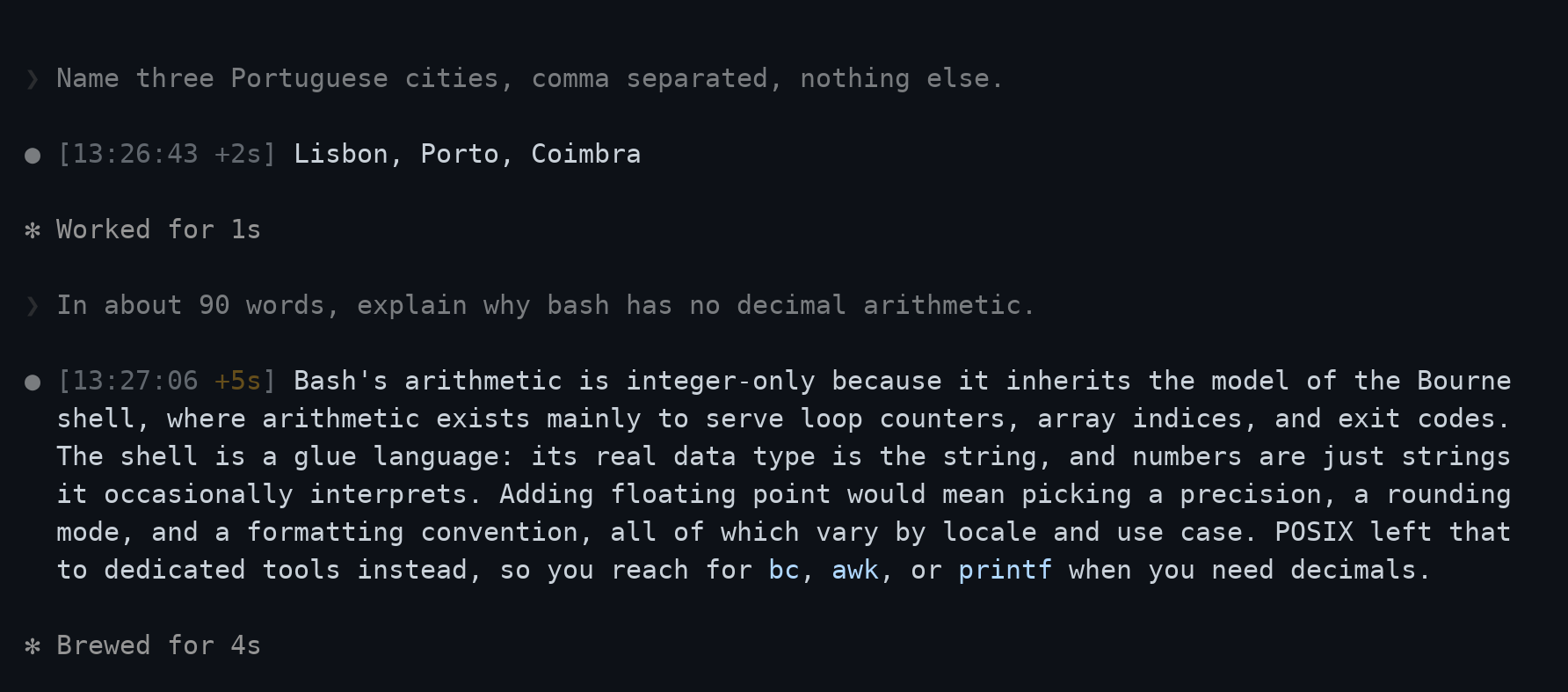
Two fast turns render dim. The third crossed the slow threshold, so its duration is coloured.
Capabilities
/timestamps changes the current user's settings without you having to find the settings file. The command takes the request directly, so /timestamps tokyo, /timestamps no colour and /timestamps 12 hour clock all work in one step; run it with no argument and it asks. Changes take effect on your next message, because every hook reads the settings file again on each call.
Seven hooks, all of them harness-only, so none of them cost model context.
| Hook | Job |
|---|---|
SessionStart | Check jq, prune old state, point a new user at /timestamps |
UserPromptSubmit | Record the turn start, tell the model the local time |
MessageDisplay | Draw the marker on the first batch of each message |
SessionEnd | Report the summary, record the session, clear its state |
PreToolUse / PostToolUse / PostToolUseFailure | Time tool calls and count failures, only when TOOL_TIMING=on |
MessageDisplay fires repeatedly as a message streams. Only the first batch gets a marker; the rest return nothing at all, which Claude Code reads as 'show the original text'. Returning the text unchanged would have meant a wasted round trip on every batch of every message.
Configuration
Settings live in ~/.claude/claude-timestamp.conf as KEY=value, checked against a list of known keys and never executed, so a stray line in it cannot run anything. A project can layer its own settings on top in .claude/claude-timestamp.conf; only the keys it names are overridden.
| Setting | Default | What it does |
|---|---|---|
TZ | machine local | IANA name such as Europe/Amsterdam, or empty for local time |
DISPLAY_FORMAT | 24h | 24h, short, 12h, iso, or any strftime string |
COLOR | dim | none, dim, gray, red, green, yellow, blue, magenta, cyan |
ELAPSED | on | Shows how long the turn took |
SLOW_AFTER | 60 | Colours the duration past this many seconds, 0 disables |
IDLE_AFTER | 3600 | Marks a gap this long between messages, 0 disables |
SUMMARY | on | Reports session totals on exit |
TOOL_TIMING | off | Times individual tool calls; the only setting that costs anything per tool call rather than per message |
A value the plugin cannot use is replaced by its default, and is named at the start of the next session.
Platform notes
Tested on Linux, macOS and Windows on every push. Git Bash on Windows ships without a timezone database: date there silently falls back to UTC for any IANA name it cannot resolve. The plugin detects this, uses local time instead, mentions it once at session start, and refuses to write a pinned zone it knows cannot be honoured. UTC and GMT still work, since those need no database.
Tool timings use sub-second precision where the shell provides it, which needs bash 5 or newer. macOS still ships /bin/bash as bash 3.2, and BSD's date has no %N, so there is no portable fallback: on those platforms durations round to whole seconds and the call counts carry the signal.